

Close Menu
    Facebook X (Twitter) Instagram
    Trending
    • SharePoint Internal Column Name Encoded Character List
    • Satchel Pelts List for Red Dead Redemption 2
    • Create a Video Wall With FFmpeg
    • Mitsubishi Outlander Towbar Electrics
    • Mitsubishi Outlander Towbar Installation
    • Telephone Block List
    • Hard Drive Repair After Wrong Voltage Mishap
    • How To Send Excel Workbook As Email Using Button
    YouTube Instagram Facebook RSS
    Technology Spy
    • Tutorials & Help
    • Reviews
    Technology Spy
    You are at:Home»Security»Top 7 WordPress Usernames To Avoid
    WordPress Logo

    Top 7 WordPress Usernames To Avoid

    0
    By Matt on August 29, 2014 Security

    I have been using WordPress for a few years and I’ve grown to love it’s simple and well presented interface. What I have noticed is the volume of people trying to log into my sites by guessing usernames and then presumably trying guessed or randomly generated passwords. I’ve been logging the usernames they are using and the pattern has become very clear. So here are my Top 7 Usernames to Avoid on your WordPress site.

    Of all the usernames spammers have been trying to use the following form the basis of 95% of attempts. The other 5% are made of slightly more unusual names but these may be due to confusion rather than deliberate attempts to do something naughty.

    In no particular order the usernames to avoid are …
    • Padlock and Keysuser
    • test
    • admin
    • administrator
    • [user display names]
    • [user “author archive” names]
    • [combinations of your site name]

    There are four approaches spammers will try :

    1. Guess based on based on common usernames (i.e. “admin”)
    2. Guess based on the site name (i.e “tech-spy”)
    3. Assume the author name that appear next to a post is a real username (i.e. “Matt”)
    4. Assume the name that appears in the author archive link is a real username (i.e. https://www.tech-spy.co.uk/author/matt/)

    Defend Against Type 1 and 2

    If you avoid usernames based on my list above you will avoid spammers simply assuming what your login names are. Easy.

    Defend Against Type 3

    When you create a user within WordPress you set a “username”. The user can then set a “nickname” and a “display” name to show publicly alongside posts. Spammers will assume this Public name is also the username and use that as the basis for their login attempts.
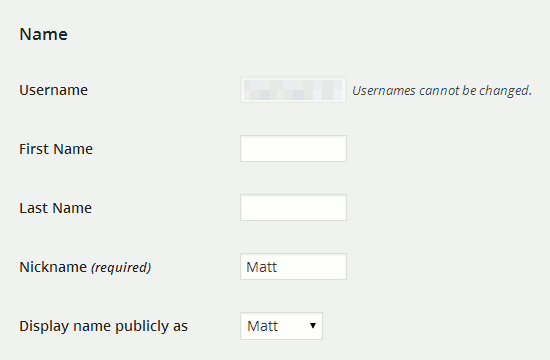
    WordPress User Profile Screenshot
    WordPress User Profile Screenshot

    Make sure your usernames never match the nickname or public display name used by your authors. It’s easy to change! Your username could be “JohnX” but your display name could be a friendlier “John”. The spammer will then assume the username is John and get it completely wrong.

    Defend Against Type 4

    WordPress provides links to an “author archive” which lists all posts by a specific author. The link looks something like :

    http://www.tech-spy.co.uk/author/matt/

    The name used in this link is a database field called “user_nicename”. It is set to the username on creation and you can’t change it afterwards from within the Dashboard. This is really irritating and something I hope the WordPress team change at some point. User names should never be exposed within a public facing system. I changed mine by modifying the value in my “users” database table using phpMyAdmin.

    Final Thoughts

    Like all aspects of security no one technique is good enough on it’s own but needs to form a layered approach. Avoiding the above usernames doesn’t cost you a penny and is easy to implement. It won’t stop someone attempting to login into your account but if they are guessing the wrong username they are going to be falling at the first hurdle. Just the way we like it!

    Share. Facebook Twitter Pinterest LinkedIn Tumblr Email
    Previous ArticleLumsing PBJ-6200 6000mAh USB Power Bank Review
    Next Article Living With A Sigma BC 1009 Cycle Computer

    Related Posts

    Telephone Block List

    How to Verify Checksum of a File

    Free Box of Chocolates from British Gas or Email Scam?

    Leave A Reply Cancel Reply

    This site uses Akismet to reduce spam. Learn how your comment data is processed.

    109

    Recent Posts
    May 1, 2025

    SharePoint Internal Column Name Encoded Character List

    March 24, 2025

    Satchel Pelts List for Red Dead Redemption 2

    January 29, 2025

    Create a Video Wall With FFmpeg

    Categories
    • 3D Printing
    • Android
    • Arduino
    • Development
    • ESP8266
    • Excel
    • Gaming
    • General
    • GIMP
    • Home Automation
    • JavaScript
    • Linux
    • Microsoft Office
    • Mobile Devices
    • Oracle APEX
    • Python
    • Raspberry Pi
    • Reviews
    • Security
    • SharePoint
    • Tutorials & Help
    • VBScript
    Web Tools

    A set of quick and basic online tools for web designers and software developers :

    • Hash Generator
    • Text to HTML List
    • Text to HTML Table
    • URL Encoder and Decoder
    • UNIX Timestamp Calculator
    • LED Resistor Calculator
    • Extract Email from Text
    • Mortgage Calculator
    Tags
    Android APEX Apple Arduino Black Friday Coolermaster csv Elite Dangerous email ESP-01 ESP8266 EV Excel file handling Format gaming GIMP Gritin Home Assistant Home Automation Linux lists Media os.stat os.walk Outlander Power Python Qi RDR2 Review scam Security SharePoint 2010 string Syncwire text text files TrueCrypt Ubuntu USB-C VBA VBscript Windows 10 Xbox One
    About

    Welcome to Technology Spy, a site devoted to gadgets, computers, programming and all things technology! You’ll also find product reviews for items I own as well as tutorials, guides and scripts for the software I use.

    Archives
    Other Resources
    • MattsBits
    • Raspberry Pi Spy
    YouTube Facebook Instagram Pinterest RSS

    Entries RSS | Comments RSS

    Copyright © 2025 - All Rights Reserved - Matt Hawkins

    mastodon.social@MattHawkins

    Type above and press Enter to search. Press Esc to cancel.