Close Menu
    Facebook X (Twitter) Instagram
    Trending
    • SharePoint Internal Column Name Encoded Character List
    • Satchel Pelts List for Red Dead Redemption 2
    • Create a Video Wall With FFmpeg
    • Mitsubishi Outlander Towbar Electrics
    • Mitsubishi Outlander Towbar Installation
    • Telephone Block List
    • Hard Drive Repair After Wrong Voltage Mishap
    • How To Send Excel Workbook As Email Using Button
    YouTube Instagram Facebook RSS
    Technology Spy
    • Tutorials & Help
    • Reviews
    Technology Spy
    You are at:Home»Gaming»ADX Firefight MK02 RGB Mechanical Gaming Keyboard Modes
    AFX ADX MK02 Mechanical Keyboard

    ADX Firefight MK02 RGB Mechanical Gaming Keyboard Modes

    0
    By Matt on February 13, 2019 Gaming, Tutorials & Help

    The ADX Firefight MK02 RGB Mechanical Gaming Keyboard is sold in PC World / Currys. It provides a number of light modes but these aren’t explained very well in the documentation. Here is a list of the available light modes to help you configure your keyboard.

    I purchased this keyboard as I wanted key illumination. It seemed to be a sensible price for a keyboard with a number of lighting options and a bit of customisation. My main use for it is typing and productivity tasks rather than gaming and I’m happy with it so far.

    MK02 Specifications

    • Model AFXMK0217 / ADXMK0217
    • Dimensions : 148 x 450 x 40 mm (221 x 450 x 40 mm with wrist rest)
    • Net Weight 1.25kg (1.36kg with wrist rest)

    ADX MK02 Gaming Keyboard User Manual

    The official user manual is available from the TeamKnowHow support site :

    ADX MK02 RGB Mechanial Gaming Keyboard User Manual

    User Manual Summary

    The interesting bits from the user manual are :
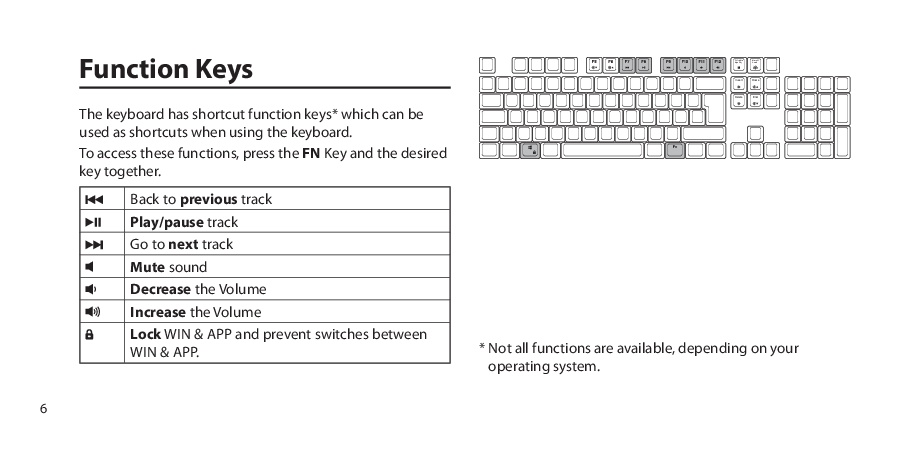
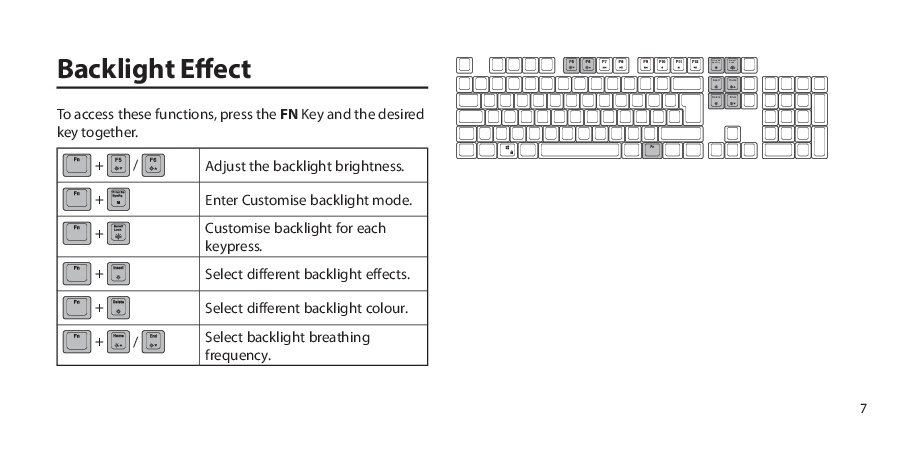
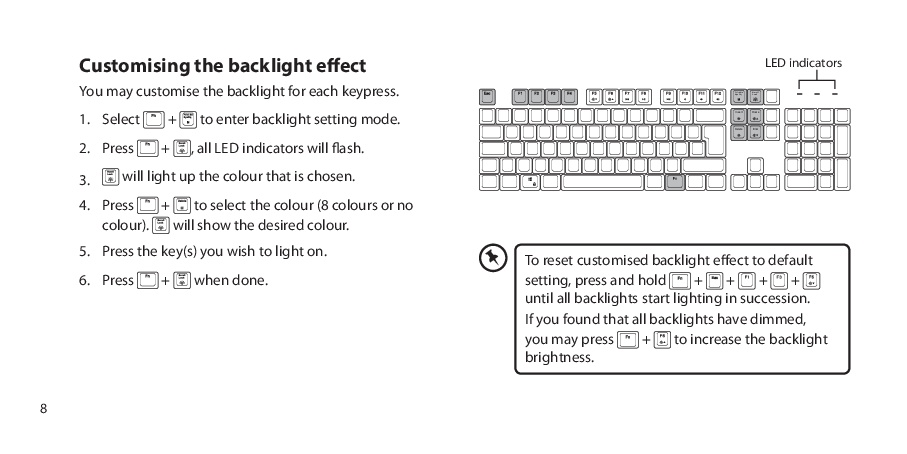
    ADX MK02 Mechanical Keyboard User Manual ADX MK02 Mechanical Keyboard User Manual ADX MK02 Mechanical Keyboard User Manual

    ADX MK02 Gaming Keyboard Light modes

    To set one of the preset RGB lighting modes press [Fn]+[Insert].

    The preset back-light effects will cycle through the sequence shown below :

    #ModeDescription
    1OffNo lights
    2Side FadeAll keys fade on/off left to right.
    3Row fadeEach line has a different colour and the colour moves from top to bottom
    4Single KeyAll keys off. Pressing key lights up and slowly fades off.
    5Single ColourWhole keyboard fades in and out.
    6Whole Keyboard Colour FadeWhole keyboard slowly fades between the colours.
    7Single Key BurstAll keys off. Pressing a key sends out a burst across whole keyboard.
    8Permanently onAll keys are illuminated with single colour
    9Rainbow KeysAll keys lit up in random colours. Colours slowly cycle.
    10Line burstAll keys off. Pressing key lights up keys in the same row with a single colour.
    11Random one colourAll keys quickly randomly fade in and out with a single colour.

    [Fn]+[Delete] will change the colour for some of the modes. For example in mode 2 pressing [Fn]+[Delete] will allow you to choice the colour that is used for the left-to-right fade.

    Some of the effects are very similar so you might need to run through the sequence on your keyboard to find your place in the sequence.


    Note: The “ADX” brand appears to be a renamed version of “AFX”. As far as I can tell the “AFX MK02” is the same keyboard as the “ADX MK02”.

    Share. Facebook Twitter Pinterest LinkedIn Tumblr Email
    Previous ArticleGritin USB-C Cable 3 Pack
    Next Article Enable Deep Sleep on an ESP-01 Module

    Related Posts

    Satchel Pelts List for Red Dead Redemption 2

    Create a Video Wall With FFmpeg

    Mitsubishi Outlander Towbar Electrics

    Leave A Reply Cancel Reply

    This site uses Akismet to reduce spam. Learn how your comment data is processed.

    109

    Recent Posts
    May 1, 2025

    SharePoint Internal Column Name Encoded Character List

    March 24, 2025

    Satchel Pelts List for Red Dead Redemption 2

    January 29, 2025

    Create a Video Wall With FFmpeg

    Categories
    • 3D Printing
    • Android
    • Arduino
    • Development
    • ESP8266
    • Excel
    • Gaming
    • General
    • GIMP
    • Home Automation
    • JavaScript
    • Linux
    • Microsoft Office
    • Mobile Devices
    • Oracle APEX
    • Python
    • Raspberry Pi
    • Reviews
    • Security
    • SharePoint
    • Tutorials & Help
    • VBScript
    Web Tools

    A set of quick and basic online tools for web designers and software developers :

    • Hash Generator
    • Text to HTML List
    • Text to HTML Table
    • URL Encoder and Decoder
    • UNIX Timestamp Calculator
    • LED Resistor Calculator
    • Extract Email from Text
    • Mortgage Calculator
    Tags
    Android APEX Apple Arduino Black Friday Coolermaster csv Elite Dangerous email ESP-01 ESP8266 EV Excel file handling Format gaming GIMP Gritin Home Assistant Home Automation Linux lists Media os.stat os.walk Outlander Power Python Qi RDR2 Review scam Security SharePoint 2010 string Syncwire text text files TrueCrypt Ubuntu USB-C VBA VBscript Windows 10 Xbox One
    About

    Welcome to Technology Spy, a site devoted to gadgets, computers, programming and all things technology! You’ll also find product reviews for items I own as well as tutorials, guides and scripts for the software I use.

    Archives
    Other Resources
    • MattsBits
    • Raspberry Pi Spy
    YouTube Facebook Instagram Pinterest RSS

    Entries RSS | Comments RSS

    Copyright © 2025 - All Rights Reserved - Matt Hawkins

    mastodon.social@MattHawkins

    Type above and press Enter to search. Press Esc to cancel.